Motorola手机的系统我非常喜欢。
从我目前的使用来看,在国内的体验,非常不错。
几个显著的优点如下:
- 最大程度地保留了原生安卓,同时优化了原生安卓不好用的功能,UI等(例如原生通讯录、SMS、电话等)
- 系统没有广告
- 支持GMS
- 内置的联想MS似乎没有什么厂商接入,所以所有的应用都无法后台推送消息!,包括微信在内,只要进程一关,就无线电静默了!太爽了!(如果想要保留推送,就锁定进程,就有后台推送了)。这个功能我估计恨的很死,爱的爱死,我就是后者。
- 可以同时支持原生商店和Play商店,原生商店就作为国内的分发渠道来使用,其他应用都通过Play下载,很舒服。
- 在删除了下面这些没用的组件(也就是本文主要的内容)之后,系统变得无比干净,非常纯净。
- 几乎所有的内置软件都可以卸载,包括联想的乐云服务(真的要给moto点赞)。
总的来说,我觉得mmotorola团队在开发这一款系统的时候,非常克制,非常理性,我很喜欢。
我之前一直用的是小米,刷欧洲版或者国际版ROM,虽然可以刷,但刷完免不了要为下载国产应用、广告这些东西而烦,经过一番调研,这次入手morotola,其系统让我感到非常理想,就和索尼、三星系统的感受差不多,甚至有过之而不无机。
系统的应用被我删的就剩下面几个(上面两排):
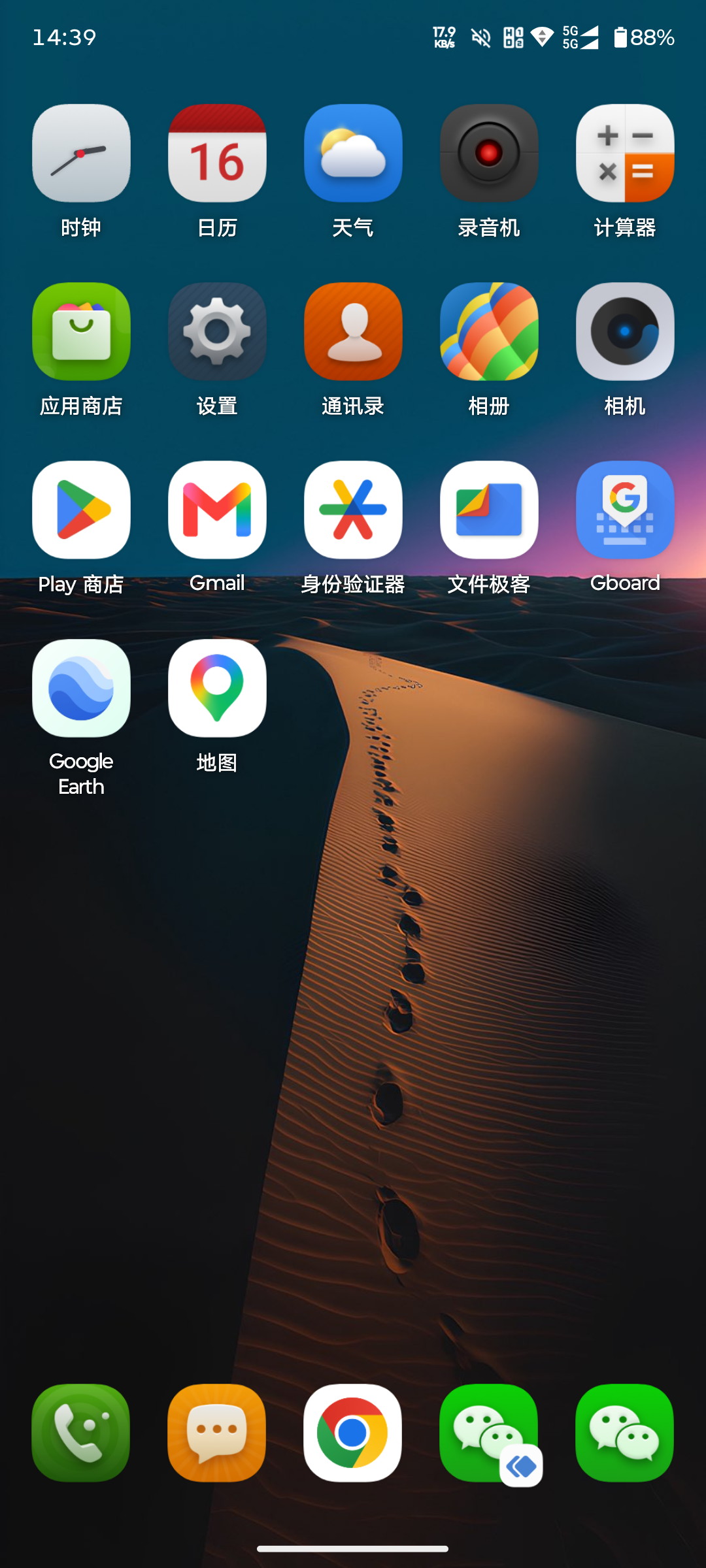
当然也说说几个显著的缺点,首先是联想的应用商店、自制的应用等做的很一般,比如天气这些,点击天气会跳到一个充满广告的外部网页,当然你可以选择把天气卸载掉。
还有,MAXE引擎,明明有高性能,它不让你用,你开了过一会就给你关掉。这个我已经在研究怎么让它始终保持开启了,经过测试,删掉下面的AI组件似乎能让MAXE保持高性能的时间更长,但后台估计还有某个应用会自动把MAXE引擎高性能关掉,目前还没有找到是哪个,随它去了。
但也正是这些粗糙的存在,让我感到这个系统竟有点淳朴的美,也许是古法编程之美,用我老婆的话说,叫很有活人感。
另外就是内置的大模型、AI这些功能非常无用,调用的是第三方大模型,但又没实现好,比如让大模型画张画,它画完不是把图片发你,而是发给你一个URL,你在应用里还点不开,复制到浏览器打开,就是403,给我整笑了。
好在通过下面的这些命令,你可以把联想的这些内置垃圾软件清理掉。
清理掉那些系统的组件后,你会感到系统流畅不少,也更省电。
另外,如果删除组件遇到问题,导致系统无限重启,可以进入recovery模式,恢复出厂设置,但是数据会全部丢失。
如果没有导致无限重启,或者可以进入adb的情况下,可以通过adb shell pm install-existing --user 0 [PACKAGE_NAME]来恢复错删的应用,下面有示例。
这也是我们采用adb shell pm uninstall --user 0 [PACKAGE_NAME]命令删除软件的好处,就是应用其实并不是真的被删除,可以重新恢复。
以下是操作命令。
注意:除非你清楚知道你在做什么,否则请勿轻易尝试下面的命令,尤其是卸载命令,否则可能会造成你的数据丢失、财产损失、手机损坏从而回女朋友消息不及时,导致分手等情况,请慎重!本作者不对任何导致的情况负责。
删除(卸载)无用的AI组件、联想服务等
1
2
3
4
5
6
7
8
9
10
11
12
13
14
15
16
17
18
19
20
21
22
23
24
25
26
27
28
29
30
31
32
33
34
35
36
37
38
39
40
41
42
43
44
45
46
47
48
49
50
51
| adb shell pm uninstall --user 0 com.sohu.inputmethod.sogou.moto
adb shell pm uninstall --user 0 com.sina.weibo
adb shell pm uninstall --user 0 com.zui.browser
adb shell pm uninstall --user 0 com.zui.filemanager
adb shell pm uninstall --user 0 com.motorola.launcherconfig.overlay.cmcc
adb shell pm uninstall --user 0 com.motorola.cn.devicemigration
adb shell pm uninstall --user 0 com.motorola.spaces
adb shell pm uninstall --user 0 com.motorola.genie
adb shell pm uninstall --user 0 com.motorola.fmplayer.prc
adb shell pm uninstall --user 0 com.motorola.moto
adb shell pm uninstall --user 0 com.motorola.aiservices
adb shell pm uninstall --user 0 com.motorola.aicore
adb shell pm uninstall --user 0 com.motorola.airgesture
adb shell pm uninstall --user 0 com.motorola.airgesture.incall
adb shell pm uninstall --user 0 com.motorola.prcaisafety
adb shell pm uninstall --user 0 com.lenovo.xiaotian.trigger
adb shell pm uninstall --user 0 com.motorola.android.systemui.overlay.xiaotian
adb shell pm uninstall --user 0 com.motorola.aicore
adb shell pm uninstall --user 0 com.lenovo.menu_assistant
adb shell pm uninstall --user 0 com.motorola.cn.smartservice.trip
adb shell pm uninstall --user 0 com.motorola.cn.smartservice
adb shell pm uninstall --user 0 com.motorola.cn.smartscene
adb shell pm uninstall --user 0 com.motorola.smarteye.ui
adb shell pm uninstall --user 0 com.motorola.smarteye
adb shell pm uninstall --user 0 com.motorola.cn.searchintelligence
adb shell pm uninstall --user 0 com.motorola.wallpaperphotoshuffle
adb shell pm uninstall --user 0 com.motorola.maxesetting
adb shell pm uninstall --user 0 com.motorola.cn.smartplugins
adb shell pm uninstall --user 0 com.motorola.aiservices
adb shell pm uninstall --user 0 com.motorola.prcaisafety
adb shell pm uninstall --user 0 com.motorola.setup.overlay.pai
adb shell pm uninstall --user 0 com.motorola.android.overlay.crystaltalkai
adb shell pm uninstall --user 0 com.motorola.cn.prcsettingsext
adb shell pm uninstall --user 0 com.motorola.motointelligence
adb shell pm uninstall --user 0 com.lenovo.lfh.smartscanner
adb shell pm uninstall --user 0 com.motorola.myfavorite
adb shell pm uninstall --user 0 com.lenovo.lsf.device
adb shell pm uninstall --user 0 com.lenovo.leos.cloud.sync
adb shell pm uninstall --user 0 com.lenovo.leos.cloud.sync.overlay
adb shell pm uninstall --user 0 com.lenovo.lsf
adb shell pm uninstall --user 0 com.lenovo.levoice_agent
adb shell pm uninstall --user 0 com.motorola.livewallpaper3.prebuilt.cool_bamboo
adb shell pm uninstall --user 0 com.motorola.livewallpaper3.prebuilt.sunlit_smile
adb shell pm uninstall --user 0 com.motorola.livewallpaper3.prebuilt.vibrant_sapling
adb shell pm uninstall --user 0 com.motorola.livewallpaper3.prebuilt.chroma_plume
adb shell pm uninstall --user 0 com.motorola.livewallpaper3.prebuilt.mysterious_amber
adb shell pm uninstall --user 0 com.motorola.livewallpaper3.prebuilt.twilight_twist
adb shell pm uninstall --user 0 com.motorola.livewallpaper3.prebuilt.tranquil_whale
adb shell pm uninstall --user 0 com.motorola.livewallpaper3.prebuilt.romantic_wisteria
adb shell pm uninstall --user 0 com.motorola.livewallpaper3.prebuilt.lovely_peach
adb shell pm uninstall --user 0 com.motorola.livewallpaper3.prebuilt.titan
|
启用GMS
启用了GMS之后,google的通知就好使了。
1
| adb shell pm enable com.google.android.gms
|
恢复(误)删掉的应用
1
2
3
4
5
6
|
adb shell pm install-existing --user 0 com.motorola.livewallpaper3
adb shell pm install-existing --user 0 com.motorola.cn.prcsettingsext
adb shell pm install-existing --user 0 com.motorola.setup.overlay.pai
adb shell pm install-existing --user 0 com.motorola.aiservices
adb shell pm install-existing --user 0 com.motorola.aicore
|
根据关键字查找应用
1
| adb shell pm list package | findstr moto
|
查看当前活动的窗口信息
有些组件不知道包名,可以打开它的Activity,然后在下面查看和分析它可能来自哪个包(不一定准确,需要分析):
1
| adb shell dumpsys window | findstr mCurrentFocus
|